⭒ Jane Street Challenge 1/N: Can You Design a Chip? - What is a Protocol Emulator, Common Communication Protocols, and CPU-Based Design
AI Artwork Note: The comics were produced by giving my pencil and iPad drawings to generative AI. My full process is described here.
The diagrams were also generated with AI, using artwork from my employer, Standard Kernel Co., as a color-palette reference. This blog is a personal project and isn't affiliated with, ableit not without moral support from my employer.
I'm participating in Jane Street's protocol emulator ASIC competition and figured I would write this up to document the evolution of our design.
It's also because when I say, "I'm designing a protocol emulator ASIC," and someone asks "Oh cool, what's that?", I give a pretty bad thirty-second explanation and they still don't really know what I'm doing.

The problem is that every word I need to use to explain it is itself a word that needs explaining! If only I had the time to give an explanation that introduces each word once you have what you need to understand it...
So I figured I'd write down this much longer explanation that I wish I could beam straight into people's brains but since I can't, the next best thing is to link them to it, which does fit in thirty seconds ("I wrote about it here" takes about two seconds to say, plenty of time to spare!).
Background
The objective of the competition is to design an open-source, general-purpose protocol emulator ASIC. ASIC stands for application-specific integrated circuit, which, as its name suggests, is a custom chip built for one specific purpose.
In the case of our protocol emulator ASIC, it's a chip that can be reprogrammed to communicate in almost any simple digital protocol.
Controllers, peripherals, and peers
Before we discuss protocol emulators, we need some vocabulary.
The following is probably common knowledge to people who have worked a lot in embedded systems, but I picked these words up by osmosis, and only recently realized that I've been saying them without being able to explain them properly, so I’ll define them for anyone else in the same boat.
Controller-peripheral
When two chips communicate, often one chip is in charge.
- The controller (in older datasheets is called the "master") starts every conversation and chooses which device it's addressing.
- The peripheral (in older datasheets is called the "slave") is one of the devices that can be addressed, and the peripheral only responds when asked.
For example, a thermostat's microcontroller (controller) asks its temperature sensor (peripheral) for a reading.
If, like me, you come from more of a distributed systems background, you can basically think of the controller-peripheral model as the client-server model, where the controller is the client, since it initiates every request, and each peripheral is a server, as it is constantly available and waiting around to answer requests.
Peer-to-peer
Not every arrangement works this way, though. In some arrangements, like, say, a connection opened under the UART protocol, the two devices are equals, and either side can start sending whenever it wants, sometimes both sending at the same time. This kind of arrangement has a shared name in distributed systems; we call this arrangement peer-to-peer.
For example, a GPS module can send position updates to a microcontroller, while the microcontroller sends it configuration commands to the GPS module at the same time that it is receiving the GPS's updates.
Protocols
A protocol is the set of rules both sides agree on in order to communicate. It dictates:
- which wires carry what sort of information
- how frequently bits are sent, aka clock speed
- how the bits are grouped into messages
- who is allowed to speak when
Exercise for reader
Before you read about the three most common protocols, I'd like to invite you to think about how you would design a protocol for each of the following two scenarios:
- How do you design a protocol for a controller and its (possibly numerous) peripherals, where the controller decides when to talk and who to talk to, and peripherals only speak when spoken to?
- How do you design a protocol for a pair of devices, where either one can start talking whenever it wants, even both at the same time?
In both scenarios, you'll almost certainly need a wire, the "data wire," to carry the bits that make up the contents of your message. But do you want to use one wire that carries data in both directions, or a separate wire for each direction?
And how does the recipient of the message know when to read each bit? (Hint: if the sender transmits 1, 1, 1, the data wire is high the whole time. How would the recipient know that it's three bits and not one? Maybe another wire could help...)
You may find that you reinvented one of the protocols below!
I2C - controller-peripheral
One thing you should know about I2C is that it's for controller-peripheral arrangements.
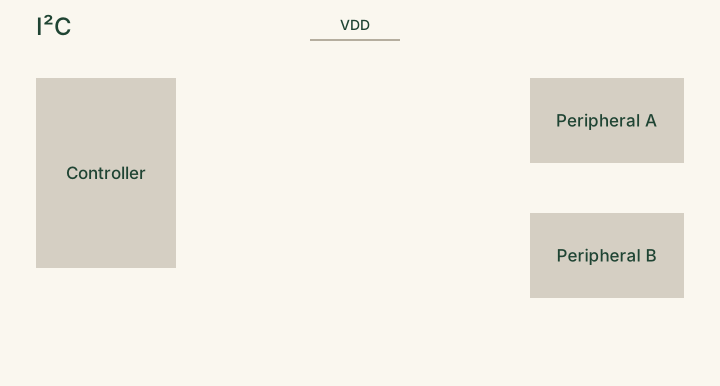
The next thing you should know about I2C is that there's only one wire for data (SDA), and it carries data in both directions: from controller to peripheral, and from peripheral to controller.
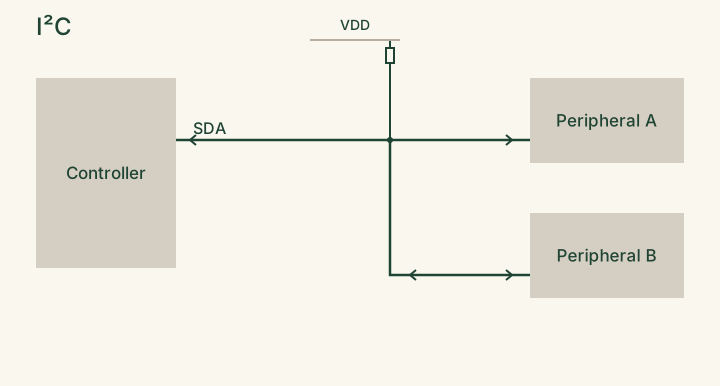
The next next thing you should know about I2C is that this data wire is shared by every device on the bus, yes, by the controller(s) and all of its peripherals, so everybody must take turns using it. (I2C even allows multiple controllers on the same bus, but most setups have just one.)
When it comes to taking turns, the controller is responsible for deciding whose turn it is on the data wire, by driving a second shared wire that is the clock (SCL) to initiate and close transactions. Since the controller drives the clock wire, it dictates the clock speed.
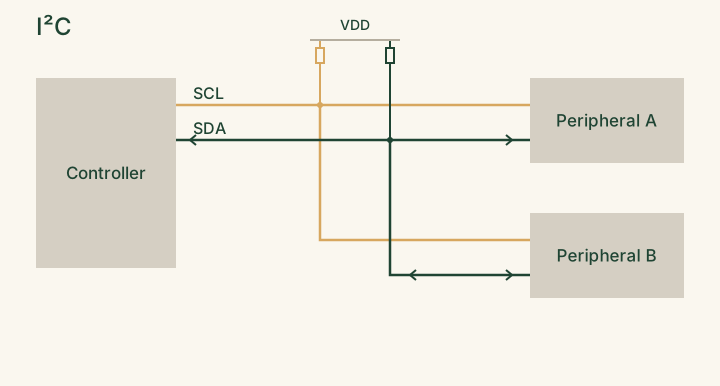
The controller starts every transaction. Peripherals only respond when addressed, and only in their assigned turn on the shared data wire.
- The controller signals a start condition to indicate that it wants to start a new transaction.
- The controller sends a 7-bit address saying which device it wants, plus a bit saying whether it wants to read or write.
- The addressed device replies with an acknowledge (ACK) bit. Then data follows one byte at a time, and whichever side is receiving acknowledges each byte.
- The controller signals a stop condition to indicate the end of the transaction.
SPI - controller-peripheral
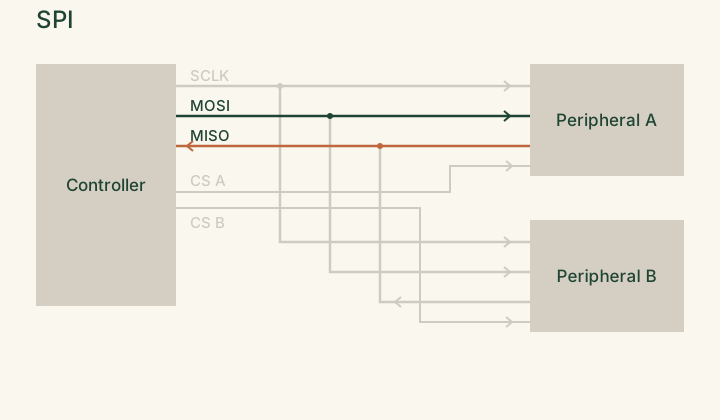
SPI uses three wires shared by every device: one for the clock (SCLK), one to carry data from controller to peripheral, and one to carry data in the opposite direction, from peripheral to controller. On top of those, each peripheral gets its own chip select (CS) wire.
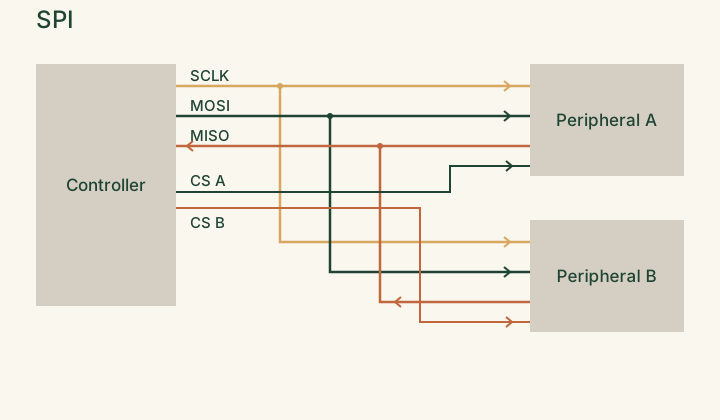
In SPI, the controller sets the clock speed for same reasons as I2C (controller drives the clock), but SPI usually runs much faster than I2C, often at several MHz or more.
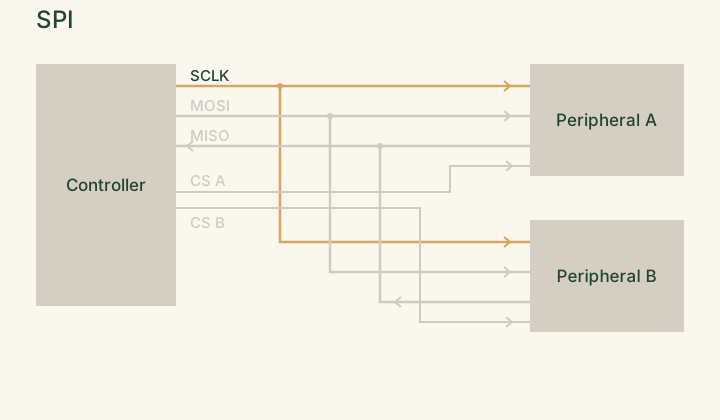
One big difference between SPI and I2C is how the controller picks which peripheral it wants to talk to. Instead of sending an address like in I2C, the controller pulls its desired peripheral's CS wire low.
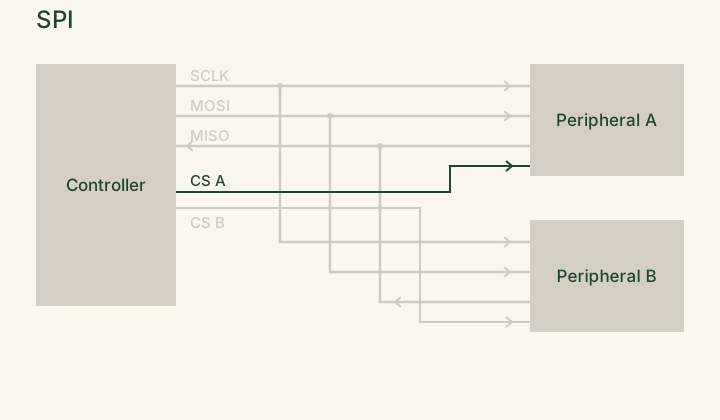
Unlike I2C, we don't have a standard message format of "you gotta send start/stop bits, you gotta send an ACK, fail to send an ACK and break yo momma's bACK!!!" As long as you've pulled a peripheral's CS wire low, you're free to send it bits. Each device's datasheet defines what the exchanged bits mean.

One reason that SPI can be this lenient is because SPI has a separate data wire for each direction, so it frees us of this turn-taking coordination around "okay, we have ONE data wire, so it can only carry bits in ONE direction at a time, and we gotta WAIT for the other side to finish before we can talk."
- In fact, both sides send bits at once! For each clock tick, the controller sends a bit and receives one bit at the same time.
UART - peer-to-peer
UART, unlike the above two controller-peripheral protocols, follows a peer-to-peer arrangement, in which either side can start sending messages whenever it wants.
In UART, two devices are connected by two data wires, one for each direction. Each device sends on its transmit (TX) wire, which connects to the other device's receive (RX) pin. Because each direction has its own wire, both devices can send messages to each other at the same time.
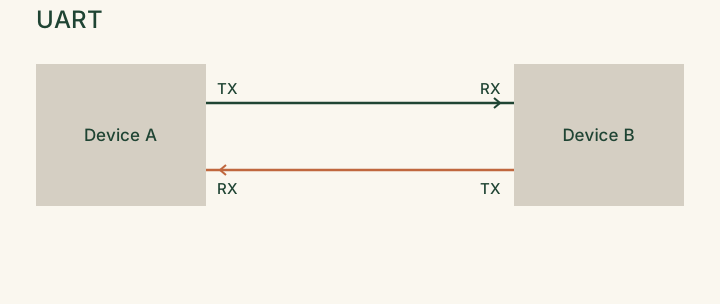
Since there's no clock wire, both devices must agree on the speed in advance. This pre-agreed speed is the baud rate, e.g. 9600 or 115200 bits per second. It tells both sides how long each bit lasts; for example, at 9600 baud, each bit is held on the wire for about 104 microseconds.
When one device wants to send a message to another, it abides by the UART protocol:
- By default, the sender's TX wire (also known as the recipient's RX wire) is high, to indicate that it is in idle state.
- The sender pulls this wire low for one bit's duration, to say, "a message is starting!" This is known as sending a start bit.
- It also gives the receiver a timing reference. From the moment the wire drops, the receiver starts counting off bit durations using the agreed baud rate, and when it checks again half a bit later and the wire is still low, the recipient registers it as, “yes, that really was a start bit, not just some noise glitch!”
- After sending this start bit, the sender sends the data bits, usually 8, one bit duration each. The receiver reads each one by checking the wire in the middle of each bit's duration, where the signal is most stable.
- The sender optionally sends a parity bit, which is an extra bit for basic error checking. The parity bit is set such that the total number of 1s comes out even (or odd, depending on the setting), so the receiver can spot a single flipped bit.
- Finally, the sender sends a stop bit, by restoring the wire to high for at least one bit's duration. This marks the end of the message and returns the wire to idle, ready for the next start bit.
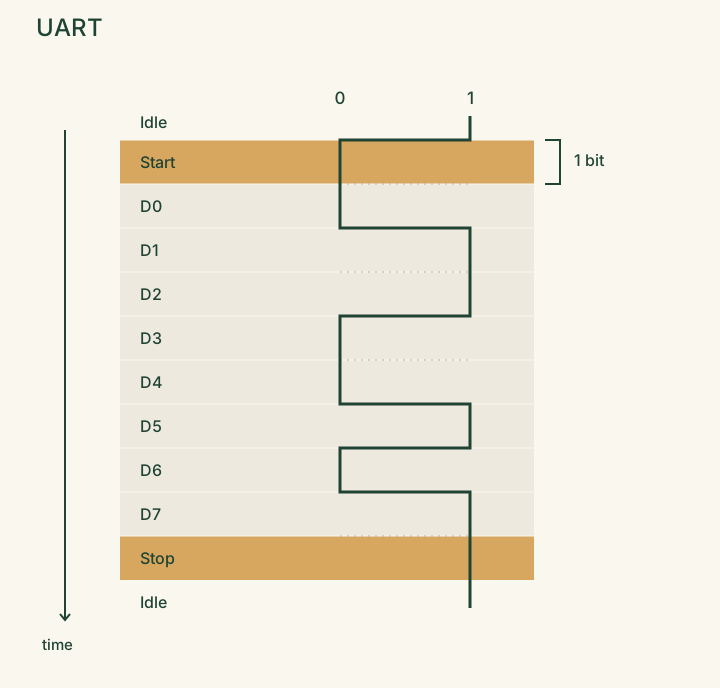
This is why the baud rate matters a lot for UART, since if the two devices disagree on the baud rate, the receiver checks the wire at the wrong moments and reads garbage.
What is a protocol emulator?
A protocol emulator is programmable hardware that can participate on either side of these conversations, as controller or peripheral.
What makes a protocol emulator unique is that it is defined in software rather than in hardware. Unlike the UART or SPI block that is built into a typical microcontroller, which can only ever communicate in the one respective protocol it was hardwired for, you can reprogram a protocol emulator to communicate in any protocol, even ones invented after the chip was manufactured, as long as that protocol fits within the chip’s timing and I/O constraints.
Concretely, a protocol emulator is a tiny processor whose instructions are built for reading and writing pins and counting clock cycles precisely enough to implement a protocol in firmware.
This is really, really useful when you want a stand-in for a device that is missing, unknown, or communicates in a nonstandard protocol.
Is your device ...MISSING?
You can use our protocol emulator to mock the behavior of a component that isn't available yet so the rest of the system can be developed. For example, you can test a board's sensors before you've finished writing firmware for the controller, or in the reverse, impersonate the peripherals as you're developing the controller.
Is your device ...UNKNOWN?
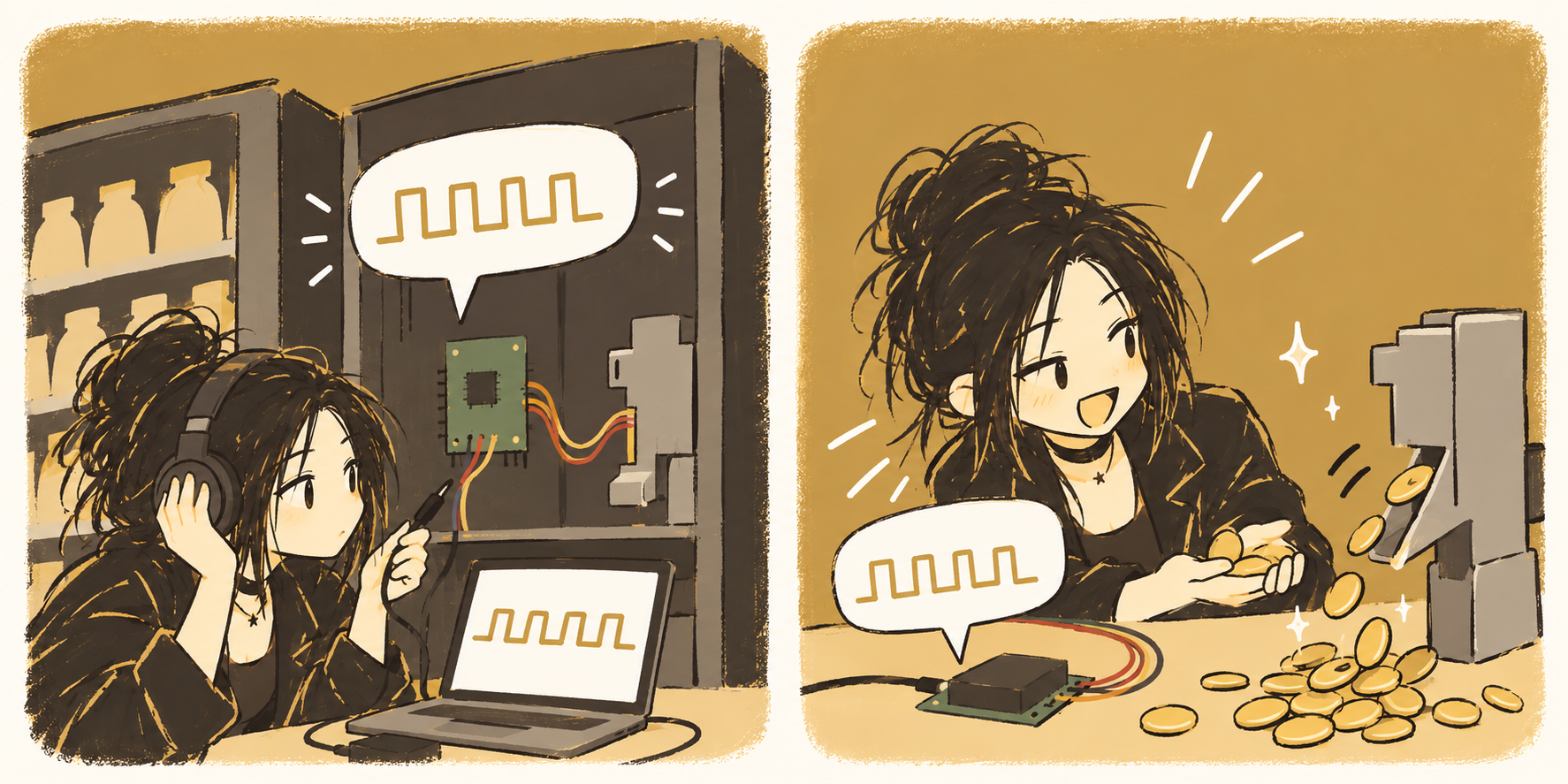
You can also use our protocol emulator chip for reverse engineering. For example, you can record the traffic between an undocumented device and its controller using a logic analyzer, then replay it by using your protocol emulator to stand in for the controller. From there you can change the data or the timing and watch how the device responds.
Is your device ...NONSTANDARD?
You can also use our protocol emulator chip to implement nonstandard protocols that a microcontroller doesn't have built-in support for.
Most microcontrollers include dedicated hardware for only a handful of common protocols, usually UART, SPI, and I2C.
Anything outside of this set of common protocols has to be handled some other way. Usually, we do this via a technique called "bit-banging".
Another way of thinking of protocol emulator is that it's a chip for bit-banging
In bit-banging, we toggle pins from software with carefully counted delays. In this way, we can "bit-bang" any protocol that our chip doesn't have dedicated hardware for, imitating in software what hardware would have done.
Problem: let's design a chip to do bit-banging
You can think of the protocol emulator as a chip that is designed to do bit-banging well. Sometimes, we want to hand the job off to a separate, dedicated chip to do the bit-banging, instead of asking our main controller to do it.
A downside having our main controller do the bit-banging is that it blocks our controller from doing more productive work; while it's busy toggling pins and counting delays, it can't do anything else.
Our controller is also in an incredibly fragile state while it's bit-banging. Remember, bit-banging isn't its only job, and it has many underlings (timers, sensors, buttons, etc.) who constantly come at it with urgent requests called interrupts. An interrupt can arrive while the controller is in the middle of bit-banging and pull it away for a few microseconds. This interrupt can be enough to throw off its timing and corrupt the message it was sending.
This is where our protocol emulator chip comes in. Our main controller hands it the data that it wants to transmit and goes back to more productive work. Since bit-banging is its only job, it doesn’t have any underlings that can interrupt it mid-message, and thus it can keep its timing precise and its messages intact.
Textbook Solution: Very Simple CPU-Based Architecture
The most common way to build a protocol emulator is to make it a very small CPU.
We see the CPU-based design in the examples that were recommended by the competition authors, such as the PIO state machines on Raspberry Pi’s RP2040 chip, or Texas Instrument's PRU cores.
I highly recommend stacksmashing's video on PIO; a lot of explanations on PIO are either too shallow or too in-the-weeds, whereas stacksmashing is concise yet complete. He also has a lot of interesting content on hardware reverse engineering!
Why a CPU?
Suppose we want a circuit that can add two numbers, add three numbers, and multiply two numbers. The most straightforward strawman approach is to build a separate circuit for each computation: a dedicated add-two-numbers block, a dedicated add-three-numbers block, and a dedicated multiply-two-numbers block.
This is a terribly wasteful use of space! Each block can only ever do one job, and whenever you're using one block, say the add-two-numbers block, the other two blocks sit idle, taking up space and doing nothing.
And if someone comes along asking for a fourth kind of computation, like, gasp, adding FOUR numbers, we collapse to the ground and cry. Then we march back to TSMC and pay to manufacture a brand new chip, because once our chip design has been taped out, we cannot change it.

“Great work on the chip! Just one smmmmmmall change, can it also add four numbers?”
The motivation behind a CPU-based architecture is that, hey, what if we stopped building a circuit for every kind of computation?
Instead, what if we represented each computation as a program, stored that program in memory, and built just one piece of hardware to run whichever program we load?
We can fit memory onto a chip far more densely than custom logic, so a program costs us far less area than a dedicated circuit.
The parts of a CPU
A CPU-based architecture has some identifiable parts. Most CPU-based architectures have:
- a small instruction memory holding a program,
- a program counter that steps through this program,
- and a few registers to store data that the program does its pute pute work on.
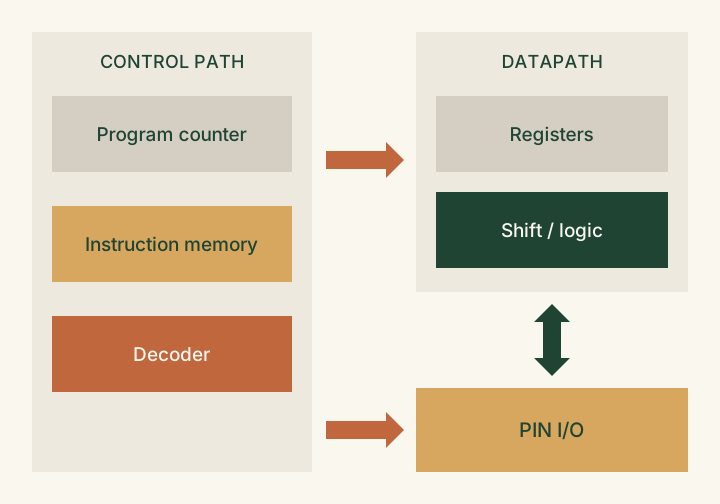
We often say that the merit of a CPU-based architecture is that it has a single datapath. We call the hardware that stores data and operates on it the datapath, and the registers are part of the datapath.
The rest of the CPU is the control path, sometimes called the control unit. It includes the instruction memory and program counter, plus a decoder that reads each instruction and translates it into signals that tell the datapath what to do (which registers to read, what operation to perform, and where to put the result).
The instruction set
What characterizes a CPU-based architecture is the kind of computation it was designed to be good at, which is defined by its instruction set. The instruction set determines which operations the chip can do in a single step, and which it can only accomplish in many steps.
A protocol emulator's purpose is bit-banging, so we'd like to keep its instruction set to the bare minimum that bit-banging needs.
If I were to brainstorm an instruction set designed for bit-banging, I'd come up with something like this:
- set a pin
- read a pin
- wait N cycles
- wait until a pin changes
- shift a bit into or out of a register
- jump
Under this instruction set, we can write a UART transmitter sort of as a loop like this:
forever:
    wait until we're handed a byte to send
      (wait until pin changes)

    set pin low, wait one bit duration

    repeat 8 times:
        set pin to the lowest bit of the byte
        shift the byte right by one
        wait one bit duration

    set pin high, wait one bit duration
Some merits of this CPU-based architecture are...
It's flexible!
Supporting a new protocol just means writing a new program.
It's area-efficient!
As we saw above, instead of a dedicated circuit for every protocol, we have one shared datapath, and each protocol is just a compact program in memory. This matters a lot when our whole chip needs to fit in a pretty constrained area.
And its timing is deterministic!
Unlike a modern general-purpose computer that has caches and, as we saw earlier, gets interrupted constantly, every instruction on our protocol emulator takes a fixed, known number of cycles, so you can count cycles exactly and calculate, on paper, when every pin will change before you run the program.
"Skew" in the history of computer systems
When I'm asked, "Can we predict how long this program will take to run just by reading its code?" or "Which is faster, a program that uses fancy shmancy primitives X and Y or a program that uses fancy primitive Z?" I like to point at Omar Rizwan's "Skew" in the history of computer systems.
Basically, Rizwan argues that our inability to predict how fast code runs comes from different parts of the computer improving at very different rates over the decades (most famous example being compute getting faster much more quickly than memory). Rather than redesign computers around this new reality of compute-faster-than-memory, engineers sort of “band-aided” over these gaps with caches, plus tricks that guess what data and instructions the CPU will need next (prefetching for data, branch prediction for instructions).
As a result, the question of how fast your code runs depends on a lot of hidden, often nondeterministic state, such as whether your data happens to be in the cache or whether the branch predictor guessed correctly, so the way to truly know whether Program A will be faster or slower than Program B is to measure the two programs.
A protocol emulator sidesteps this nondeterminism by being a computer from a more innocent time... yeah, somebody take me back to the days, before we started playing games, before the caches got stacked, and back when a program ran the same every day...
What constitutes novelty?
So....... one judging criteria for the competition is novelty of architecture.
Novelty within the CPU paradigm
Even if we stick with a CPU, there's a surprising amount of room to be creative. A CPU-based protocol emulator has many design decisions:
- How specialized is the instruction set? PIO is rather specialized, with just nine instructions that primarily concern themselves with moving bits on and off pins. Meanwhile, the other design the competition announcement points to for inspiration, TI's PRU cores, is closer to a normal processor with general-purpose arithmetic.
- A more specialized instruction set means smaller programs and smaller hardware, but some protocols become awkward to express.
- How much can one instruction do? Normally, an instruction does one job, but in the PIO design, each instruction comes with a couple of optional extra effects that happen alongside or after its main job.
- When each instruction can do more, we need fewer cycles per bit transmitted or received, but each instruction gets wider, which makes program memory more expensive.
- How many cores, and how do they coordinate? For example, PIO puts four state machines in each block, which can each run their own program at the same time.
- More cores enable more parallelism, but each additional core costs more area.
- What built-in special registers might we have? PIO has special built-in registers that allow operations such as "send the next bit" to be a single instruction, instead of the three it would take on a plainer processor: copy the byte's lowest bit into a temporary register, write that register to the pin, and shift the byte right by one.
- These specialized registers can reduce the number of instructions needed to express a program, at the cost of area.
- How is timing controlled? PIO gives each state machine its own clock divider, which slows down how often each state machine executes an instruction. Since a PIO UART program is written in terms of cycles ("hold each bit for 8 cycles"), we can change the baud rate, say from 9600 to 115200, by changing how long a clock cycle lasts, without changing a single instruction.
And a novel CPU-based design might make these design decisions differently than the competition’s reference designs, PIO and PRU, did.
...or novelty outside of the CPU paradigm
Or we can step outside the CPU paradigm and try something different.
Note how some protocols need several things to happen at the same time, like how SPI sends and receives bits on the same clock tick. Meanwhile, the CPU executes one instruction at a time.
Suppose we want a world where UART is more like SPI in this respect; how can we get ourselves a full-duplex UART? That is, how can we build a chip that, when communicating in UART, is capable of watching the RX wire while it sends stuff across the TX wire?
One thing we can do is use more instructions per bit. Instead of one loop that only transmits bits, we write one loop that juggles both jobs, taking turns between them many times per bit duration:
forever:
    # now we act as the transmitter
    if it's time for the next outgoing bit:
        set the TX pin to that bit
        move on to the bit after it

    # now we act as the receiver
    read the RX pin
    if we're idle and the RX pin just went low:
        a start bit has arrived, so start counting bit durations
    else if we're mid-byte and we've reached the middle of a bit:
        save the RX pin's value as the next incoming bit
        if that was the last bit:
            hand the finished byte to the main controller

    update our counters
As long as our chip runs this loop fast enough, each wire looks like it's getting our full attention.
Another thing we can do is take advantage of multiple cores (if we have them), each core running its own small program that handles one part of the task. This is the approach PIO takes; PIO has multiple state machines, and you can load a different program onto each state machine. For example, to get ourselves full-duplex UART on PIO, we can use one state machine to run a program for transmitting bits and a second state machine to run a program for receiving bits.
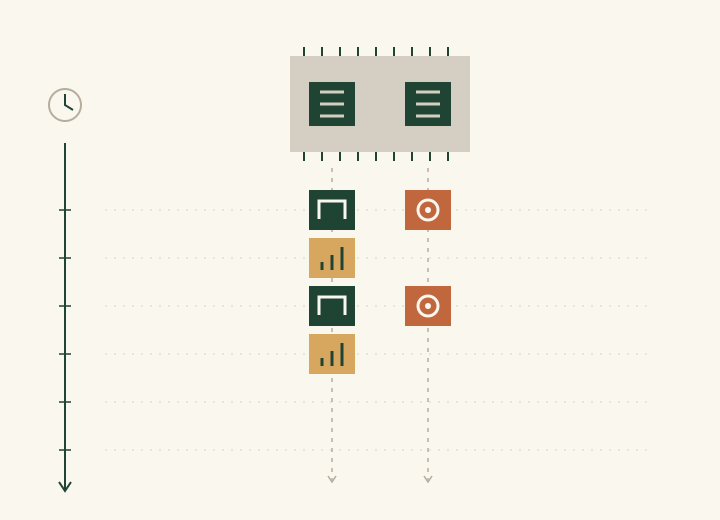
Both fixes, of more instructions per bit or more cores, have their costs.
- When we have more instructions per bit, we have a slower program, and implicitly we set a ceiling on how fast a protocol our chip can run (loosely, clock speed divided by instructions per bit).
- This ceiling can make it difficult to meet the competition's stretch goals of supporting faster, fussier protocols, such as (low-speed) USB and Ethernet. These protocols have a much higher bit rate than a typical UART and come with stricter timing and more elaborate rules for how bits are encoded, which leaves very few clock cycles to spend on each bit.
- Meanwhile, introducing more cores means duplicating the control path for every core, even though most of the hardware in the control path (the instruction memory, program counter, and decoder) can be seen as overhead of sorts, since it's responsible for figuring out what to do rather than doing it.
One curious thing about PIO is that it already bends the one-job-per-instruction rule, allowing a single instruction to do multiple things at once. Normally, an instruction does one job, but every PIO instruction comes with a couple of optional extra effects: side-set, which drives a pin in addition to the instruction's main job, and delay, which waits a few extra cycles after the main job is done.
This strongly suggests that we can think of architectures as sitting on a spectrum.
If we think of the far left as taking a computation and spreading it out across the axis of time, unraveling it into one instruction after another...
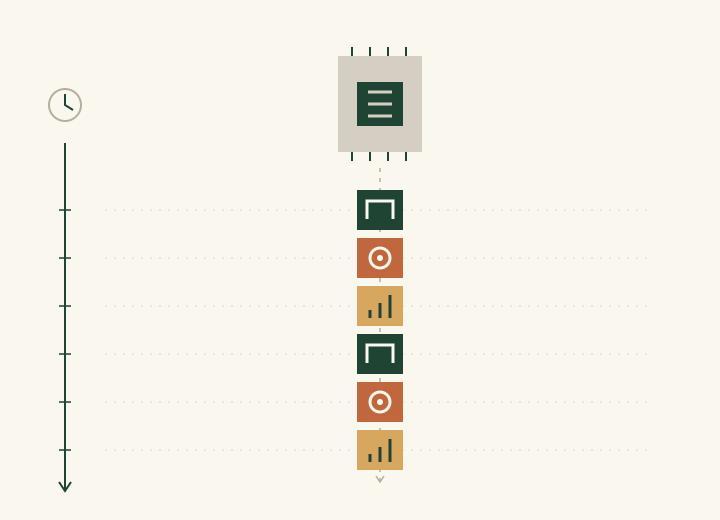
...as we march to the right, we slowly start trading time for space, so instead of each instruction doing exactly one job, we instead let each instruction do several things at once...
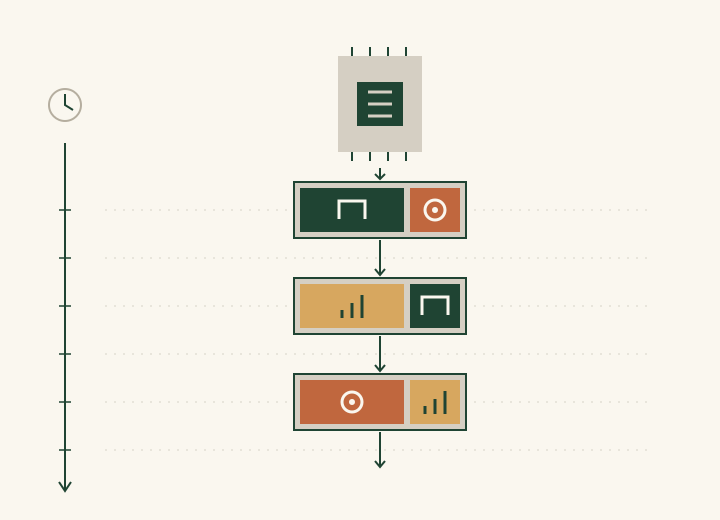
...and, if we have multiple cores, we let these instructions happen side by side.
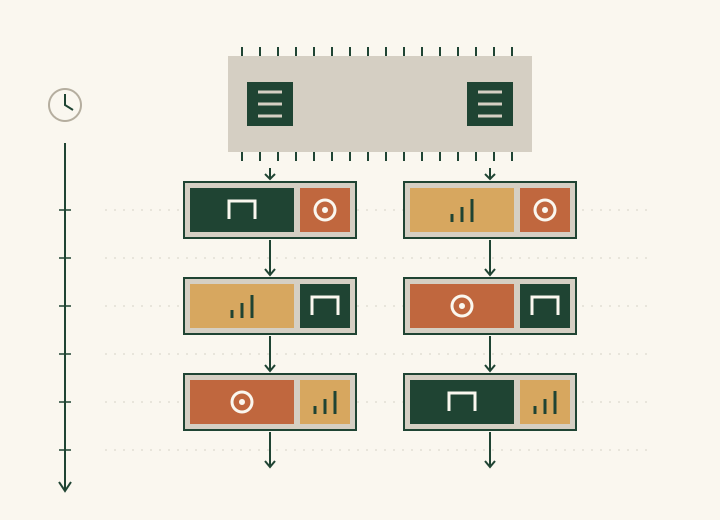
...finally, on the far right, we take a computation and spread it out entirely over space. Instead of a single processor that steps through a program, our computation is laid out across many small hardware elements working in parallel.
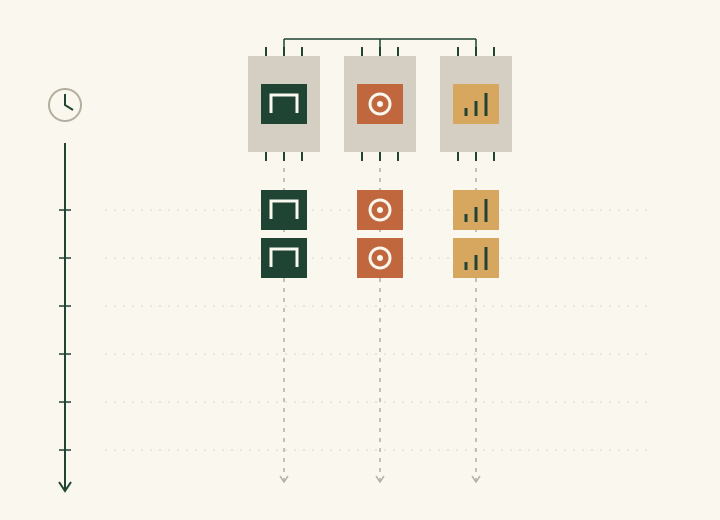
We put our architecture somewhere on this spectrum. More on how our architecture works in Part 2.